https://codewhitesec.blogspot.com/2022/06/bypassing-dotnet-serialization-binders.html
SerializationBinder 用于将给定的类型名称绑定到具体的 Type 类型
支持 BinaryFormatter, SoapFormatter, NetDataContractSerializer
微软官方不推荐使用 SerializationBinder 作为预防反序列化漏洞的检查方式
Table of contents
Open Table of contents
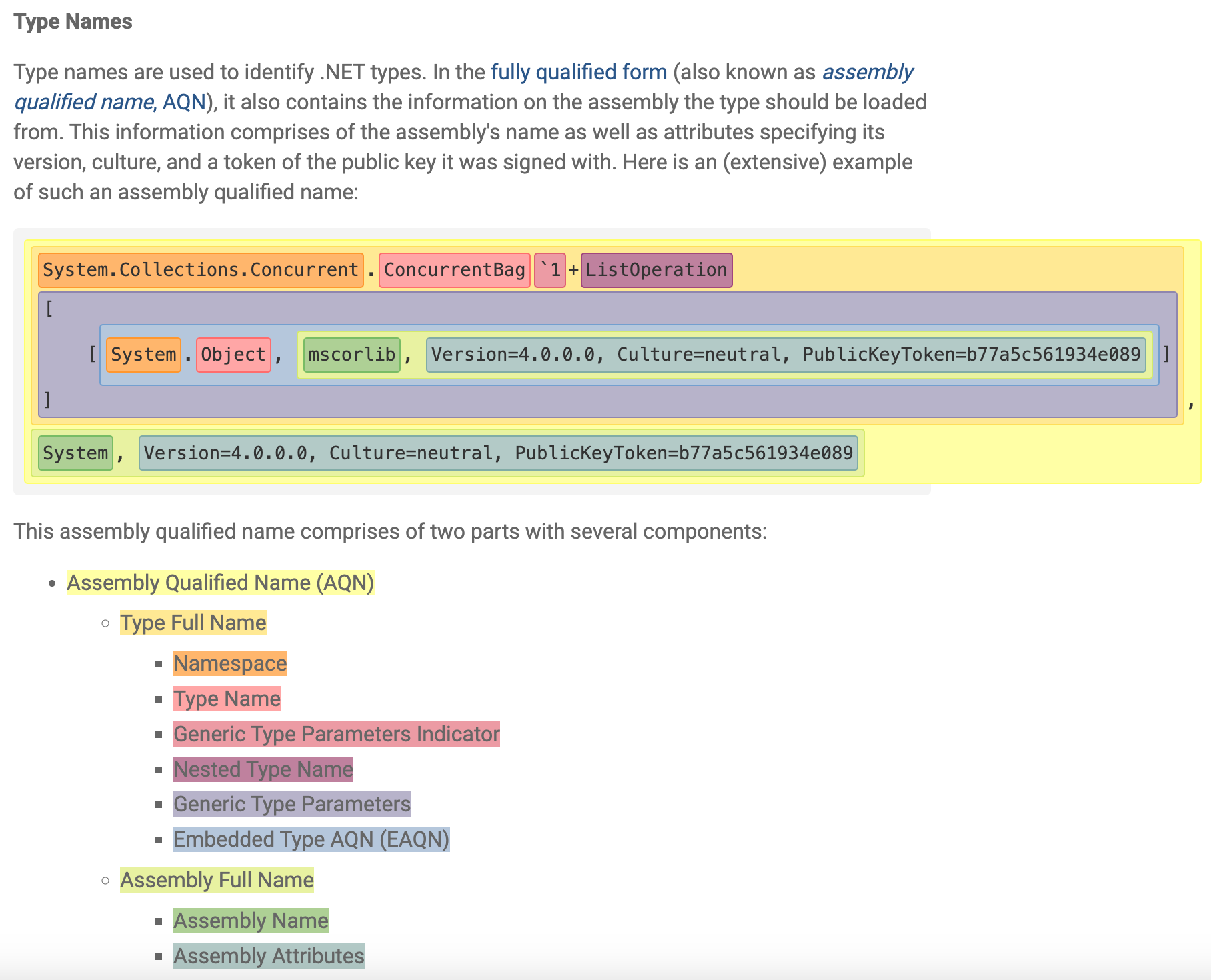
Assembly Qualified Name
https://learn.microsoft.com/en-us/dotnet/api/system.type.assemblyqualifiedname
例子
Person p = new Person
{
	Name = "xiaoming",
	Age = 18
};

Console.WriteLine(typeof(Person).Name);
Console.WriteLine(typeof(Person).FullName);
Console.WriteLine(typeof(Person).Assembly.FullName);
Console.WriteLine(typeof(Person).AssemblyQualifiedName);
输出
Person
ConsoleApp.Person
ConsoleApp, Version=1.0.0.0, Culture=neutral, PublicKeyToken=null
ConsoleApp.Person, ConsoleApp, Version=1.0.0.0, Culture=neutral, PublicKeyToken=null
关于 AQN 更详细的介绍可以参考微软文档
SerializationBinder
两个重要方法
- BindToName: 在序列化时调用, 将指定的 Type 类型转换为字符串形式的 assemblyName 和 typeName
- BindToType: 在反序列化时调用, 将 assemblyName 和 typeName 转换为指定的 Type 类型
方法签名
public virtual void BindToName(Type serializedType, out string assemblyName, out string typeName);

public abstract Type BindToType(string assemblyName, string typeName);
在使用 SerializationBinder 验证指定类型是否可以被反序列化时, 一般有两种方式
- 类型绑定之前验证: 直接检查 assemblyName 和 typeName
- 类型绑定之后验证: 先解析指定的类型, 然后检查返回的 Type 类型
绕过方式
.NET 允许解析一些不规范的类型名称
-
忽略 token 之间的空白字符
- U+0009, U+000A, U+000D, U+0020
-
类型名称允许以
.开头.System.Data.DataSet
-
程序集名称不区分大小写, 并且允许带引号
-
MsCoRlIb -
"mscorlib"
-
-
程序集属性允许加上单双引号 (不成对也行), 经过测试发现只能加在属性值的开头
-
PublicKeyToken="b77a5c561934e089" -
PublicKeyToken='b77a5c561934e089
-
-
程序集通常只需要 PublicKey 或 PublicKeyToken, 而无需指定其它属性
-
System.Data.DataSet, System.Data, PublicKey=00000000000000000400000000000000 -
System.Data.DataSet, System.Data, PublicKeyToken=b77a5c561934e089
-
-
程序集属性可以是任意顺序
System.Data, PublicKeyToken=b77a5c561934e089, Culture=neutral, Version=4.0.0.0
-
允许附加任意的程序集属性
System.Data, Foo=bar, Version=4.0.0.0, Culture=neutral, PublicKeyToken=b77a5c561934e089, Baz=quux
-
程序集属性可以包含几乎任意数据
\",\',\,,\/,\=,\n,\r,\t
同时, 如果 SerializationBinder 使用不当也会出现逻辑漏洞, 导致绕过
BinaryFormatter 在反序列化时会调用 ObjectReader.Bind
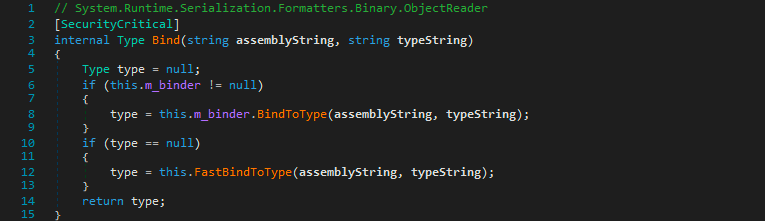
首先判断 m_binder 是否为存在, 如果存在, 就调用其 BindToType 方法 (即自定义的 SerializationBinder)
如果自定义 Binder 的 BindToType 方法返回 null, 则 fallback 到内置的 FastBindToType 方法
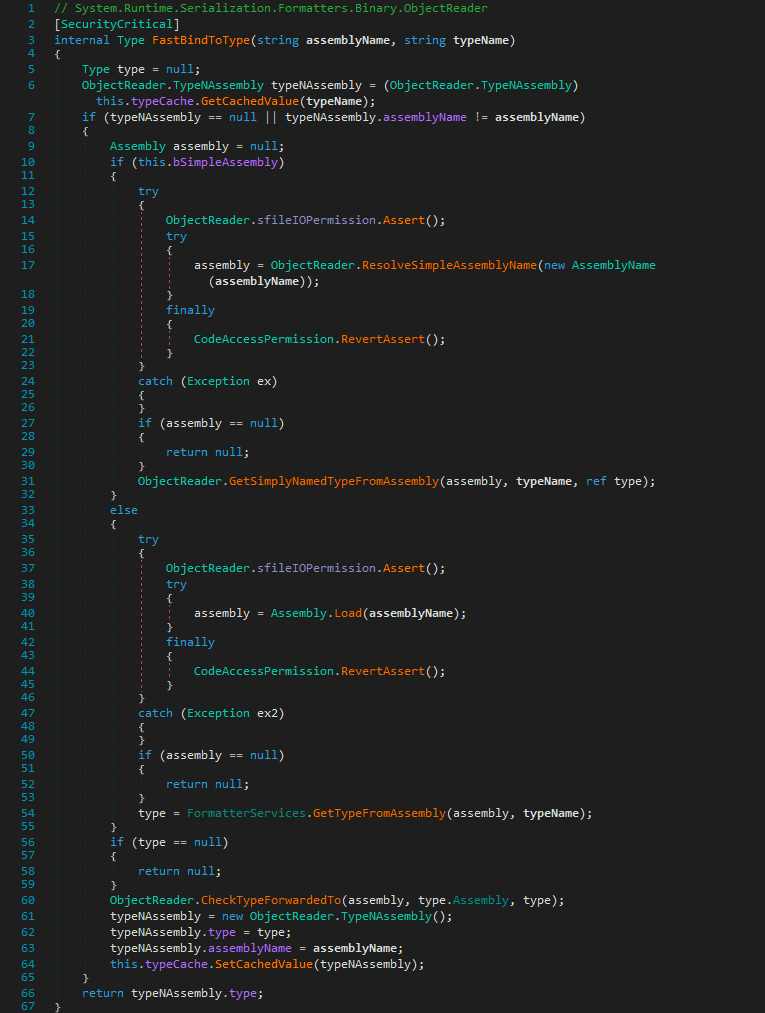
调用 GetSimplyNamedTypeFromAssembly
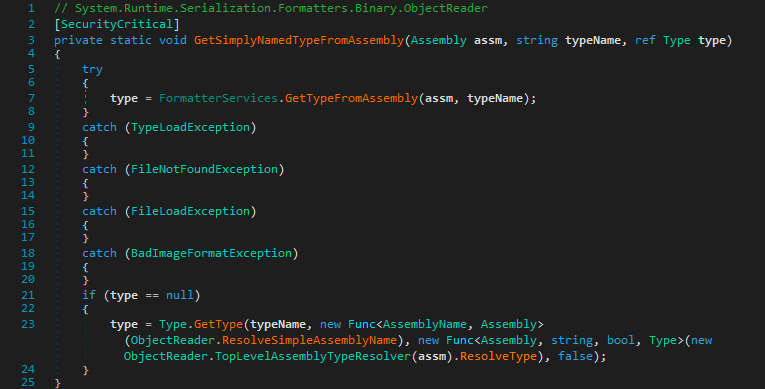
如果自定义 Binder 的 BindToType 方法在失败时仅仅返回 null, 而不是抛出异常, 那么就可以绕过过滤
Don’t return null for unexpected types – this makes some serializers fall back to a default binder, allowing exploits.
在序列化时修改类型名称的三种方式:
- 调用 SerializationInfo.SetType(Type)
- 设置 SerializationInfo.AssemblyName 和 SerializationInfo.FullTypeName
- 使用自定义 SerializationBinder 并重写 BindToName 方法
例子
using System;
using System.Runtime.Serialization;

namespace ConsoleApp
{
    internal class MySerializationBinder : SerializationBinder
    {
        public override void BindToName(Type serializedType, out string assemblyName, out string typeName)
        {
            if (serializedType == typeof(Person))
            {
                //assemblyName = "ConsoleApp,AAA=BBB,Version=1.0.0.0,Culture=neutral,PublicKeyToken=null,CCC=DDD";
                //assemblyName = "ConsoleApp, PublicKeyToken = null";
                assemblyName = "'consoleapp, Version = 1.0.0.0', Culture = neutral, PublicKeyToken = 'null";

                typeName = ".ConsoleApp.Person";
            }
            else
            {
                base.BindToName(serializedType, out assemblyName, out typeName);
            }
        }

        public override Type BindToType(string assemblyName, string typeName)
        {
            Console.WriteLine($"assemblyName: {assemblyName}");
            Console.WriteLine($"typeName: {typeName}");

            //throw new Exception("forbidden");
            return null;
        }
    }
}
using System;
using System.IO;
using System.Runtime.Serialization.Formatters.Binary;
namespace ConsoleApp
{
internal class ConsoleApp
{
public static void Main(string[] args)
{
Person p = new Person
{
Name = "xiaoming",
Age = 18
};
using (MemoryStream ms = new MemoryStream())
{
BinaryFormatter binaryFormatter = new BinaryFormatter();
binaryFormatter.Binder = new MySerializationBinder();
binaryFormatter.Serialize(ms, p);
ms.Position = 0;
Person pp = (Person)binaryFormatter.Deserialize(ms);
Console.WriteLine($"{pp.Name} {pp.Age}");
}
}
}
}具体案例:
- DevExpress framework (CVE-2022-28684)
- Microsoft Exchange (CVE-2022-23277)
分析详情见参考文章, 核心思路都是构造畸形的 assemblyName 和 typeName 使得自定义 check 逻辑返回 null, 从而 fallback 到内置的 FastBindToType 方法, 而该方法在解析时允许畸形数据, 最终实现 RCE